Seven Networks, Three Eras of Auth: Living With Other People's APIs
Part 7 of the Spotlight Media Group series. Read the overview for the method and its limits, and post 6 for the scheduler this plugs into. This repository is private with no 15-year commit history, so the code observations are reconstructed from the code; the platform-history claims link to the networks' own documentation. Code samples are illustrative, and I've left out every credential.
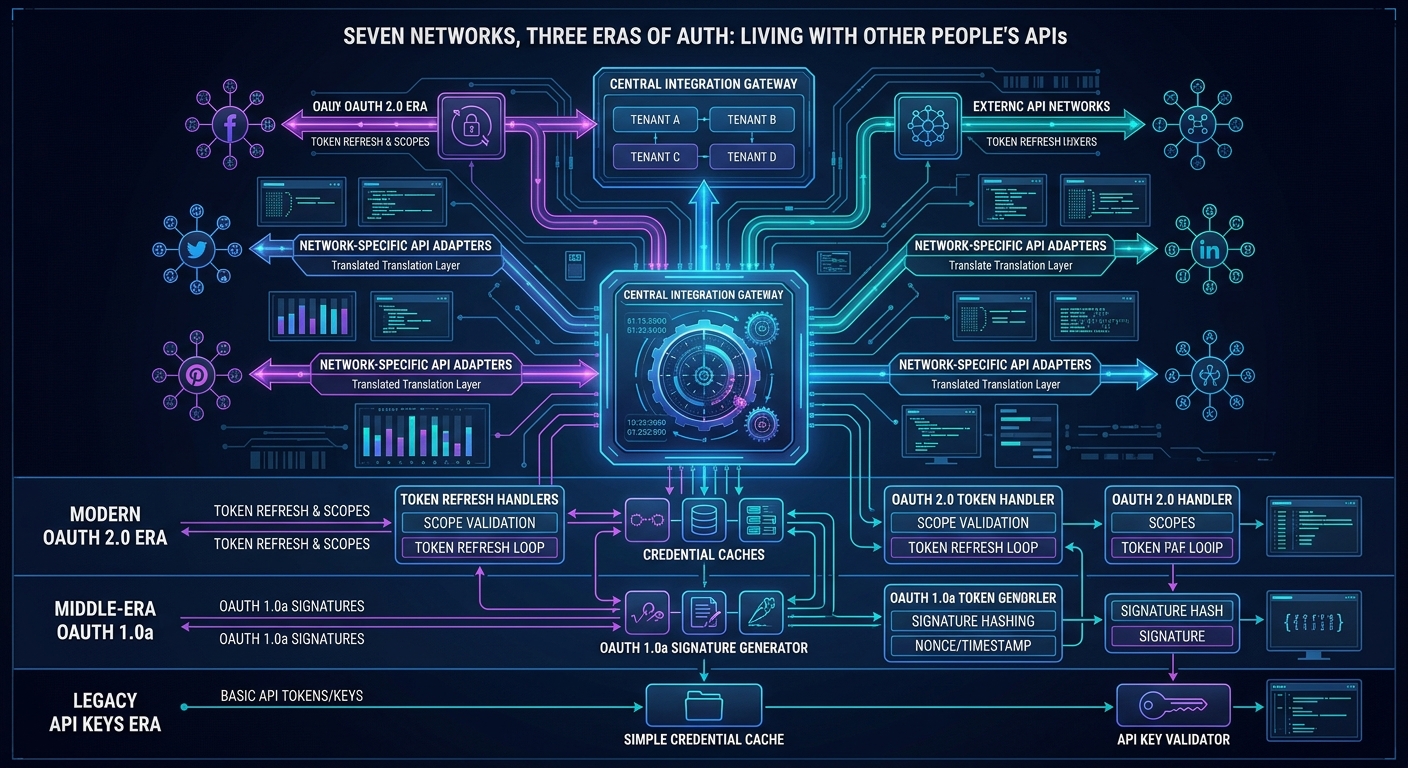
If you build on top of someone else's platform, you don't own your roadmap. Social Compass ran against seven networks (Facebook, Twitter, LinkedIn, Google+, Blogger, Pinterest, and generic blogs, per the networks table in the code), with legacy client code for Instagram and YouTube alongside. During the years this code was active, several of those networks changed their rules in ways that broke exactly the features the product was built on.
This post is a field report from that environment: how a multi-network posting layer was structured, what each network forced me to build, and which of those workarounds the platforms later made impossible. I'll mark clearly where I'm describing the code and where I'm describing the outside world, because the second half of this post is about how the outside world moved.
The structure: one dispatcher, a credentials table, a post-type taxonomy
The posting layer has three ideas that hold up well.
1. A credentials table with parent/child accounts. Every connected account is a row in a network_auth table: user, network, the network's own user ID, the tokens, and an adminAuthID. When that parent ID is non-zero the row is a sub-account of another authorization, which is how one login grants access to several Facebook Pages or LinkedIn company pages. Posting to a company page means loading the parent's tokens and posting with the child's ID.
2. A post-type taxonomy. Every post is one of a few kinds: text, tour, photo, article, micro (a listing microsite), or video. Each network has an adapter that maps those types to what that network can express.
3. One dispatcher. A single createPost method looks up the account's network, loads the right credentials, and switches to the right adapter. Everything above it (the scheduler, the proof email, the calendar, the mobile app) is network-agnostic.
// ILLUSTRATIVE RECONSTRUCTION of the dispatcher shape
function createPost(array $post): bool {
    $auth = loadAuth($post['authID']);               // may be a child; parent holds the tokens
    switch ($auth->network) {
        case 'facebook':  return facebookPost($auth, $post);
        case 'twitter':   return twitterPost($auth, $post);
        case 'linkedin':  return linkedinPost($auth, $post);
        case 'pinterest': return pinterestPost($auth, $post);
        // blogger, generic blog ...
    }
}
I'd keep that shape in any rewrite. What it lacks is a capability declaration per adapter ("this network can't do video / can't post to a personal profile / needs an image"), so those rules live scattered through the callers. That's where most of the workarounds below ended up.
What each network forced
Facebook: the personal-profile wall
The product's first promise to an agent was "post to my Facebook". Facebook's rules changed that. The code has a branch that checks whether a Facebook connection is a personal profile (no parent authorization, so not a Page), and instead of posting, emails the member a prepared post with a link to share it themselves.
That branch exists because of a platform decision. Facebook deprecated the publish_actions permission, which let an app post as a logged-in person, effective August 1, 2018, after announcing it in April of that year, and pointed developers at its Share dialogs instead (Facebook Login changelog, platform update). Pages remained postable. Today, publishing to a Page uses the Pages API with a Page access token and the pages_manage_posts permission, and those permissions require App Review before live use (Pages API: getting started).
The workaround is a good one, and I'd describe it as graceful degradation of a product promise: when the platform removes a capability, route the user to the closest thing that still works and keep the rest of the flow (the scheduled content, the branded link) intact. The cost is that "automation" became "reminder" for the largest network. I don't have the commit that introduced it, but an error handler nearby is dated in a comment to October 2018, which fits the timeline.
Other Facebook details in the code:
Tokens are re-extended on use. Every time an account is loaded, the code exchanges the stored token for a long-lived one and writes it back. That keeps accounts alive, and it also means every posting path does an extra network call and a database write. Current guidance is to exchange once server-side and, for Pages, derive a Page token that has no scheduled expiry (but can be invalidated if the user changes their password, revokes the app, or loses the Page role) (long-lived tokens).
Tokens end up in logs. The notification buffer that traces each step writes the token it just retrieved. That's a real hygiene problem: tokens belong in the database and nowhere else.
Video went by file upload. A video post downloaded the file from S3 onto local disk and uploaded it as multipart form data. That works, and it pins a web server's disk, memory, and a long request to one customer's video, the same long-running-work problem as in post 4. Today's right answer is to pass a public URL or use the platform's resumable upload and let the platform pull the bytes.
Twitter: 140 characters and a URL shortener
The Twitter adapter does what the era required. It shortens every link through an external URL shortener (a synchronous call with a five-second timeout), computes how many characters the link will consume, and truncates the message to fit in 140 characters, with different layouts per post type. A tour post is message, newline, name @ link.
Two things about this have aged. Twitter moved to 280 characters in November 2017, so a limit that was once a hard wall became a conservative default. And the client library is the OAuth 1.0a generation. The platform is now X, and per published 2026 pricing guides, new developers are on a paid, metered model with no free tier, using OAuth 2.0 with PKCE for user tokens (X API pricing in 2026, posting limits). That's a different business problem than the one this code solved: the cost of a post is now a line item.
LinkedIn: three generations of the same integration
LinkedIn is where the code's history is most visible, because four LinkedIn classes sit side by side, three carrying the same October 2017 header (clearly copied from one another), plus a much older vendored client. The dispatcher has a flag, linkedinNew, that switches between the old XML-returning share call and a newer client.
What happened outside: LinkedIn retired its v1 APIs and OAuth 1.0a effective May 1, 2019, requiring a move to v2 and OAuth 2.0, and replaced the old w_share permission with w_member_social (member posts) and w_organization_social (company pages) (LinkedIn developer program updates, migration FAQ). The code even contains a helper that exchanges an OAuth 2.0 token for an OAuth 1.0 token and secret, a bridge so accounts connected on the new flow could be used by the old posting library. It's a clever stopgap and it has an expiry date written on it. Meanwhile the API LinkedIn built after v2 is itself being replaced: the legacy ugcPosts API is documented as being retired in favor of the Posts API, with an August 17, 2026 sunset noted on the marketing-API page (UGC Post API (legacy)).
The lesson: every integration has a half-life, and the working assumption should be that you'll rewrite it twice. Isolating each generation in its own class, behind the dispatcher, is exactly what made it possible to run old and new accounts side by side while migrating.
Pinterest: you can't post words
Pinterest is image-first, so a text-only post has nowhere to go. The adapter's answer: for a plain text post, generate an image with the text rendered on it via a placeholder-image service, and pin that. For other post types it chooses a named board by type ("My Listings", "My Listing Articles", and so on) and takes the picture from the post or, if there isn't one, from the preview data it already scraped for the link.
That's a fine example of fitting your content model to the platform's data model. It's also fragile: it depends on boards existing with those exact names, and on a third-party image service staying up. The platform itself has moved too: legacy versions (v3 and v4) of the API were deprecated, and v5 requires explicit scopes and board_id instead of board names, plus a publicly reachable HTTPS image URL (Pinterest migration notice, create-pin docs). In the code's autopost path, Pinterest and Google+ are routed to a manual-post email instead of the API entirely, a product decision with a simple reason: when we built this, in 2016, those networks had no API available to us for posting, so the closest we could get was a prepared post the member published themselves. It's the same graceful-degradation move as the Facebook personal-profile email.
Google+: a network that disappeared
The network table includes Google+ as ID 4. It was shut down: Google's legacy Google+ APIs ended on March 7, 2019, and consumer Google+ closed on April 2, 2019 (Google Developers Blog, Google Chat Help). Fittingly, the company's public About page still lists Google+ among the networks Social Compass manages. Nothing in this codebase handles the death of a network, which is the most instructive gap in it: an adapter needs a lifecycle state, with "deprecated" and "disabled" as first-class values that hide the network from the UI and stop the scheduler from selecting it.
Instagram: a client for an API that was withdrawn
There's an Instagram client in the code, built on the open-source wrapper for the original Instagram API, with an app ID and secret pasted into the source (secrets in source are a topic for the final post). That original API was being phased out from 2018, with the last endpoints scheduled to end June 29, 2020 (Meta's deprecation notice, Basic Display API launch post). Publishing now requires a professional (Business or Creator) account and the Instagram Graph API, with a two-step container-then-publish flow and a 100-posts-per-24-hours limit (content publishing guide). Instagram never became part of the scheduling flow, and it isn't in the network table. We wanted it, but in 2016 the only way to automate Instagram posting was to be an approved Facebook partner, and we never had the funding or the time to get approved. So the client is a leftover of an integration that was explored and never shipped to members.
What the code didn't have: rate limits and retries
I searched the posting layer for rate-limit handling, retry logic, and HTTP 429 handling and found none. That's not an oversight so much as an emergent property: with a per-member weekly budget and one post per day in the scheduler (post 6), the product's own throttle kept it far under any network's limits. It's a reasonable design while volume is small. It stops being one when you add bulk office-wide posting, retries after failures, or analytics polling. The upgrade path is straightforward: a per-network token-bucket limiter, a retry queue with backoff and jitter, and failure states recorded per post.
How failure was handled
Two patterns, both reasonable for the time:
A health check per connection. Each network has a "get profile" call used to verify a token still works. If it fails, the member gets an email telling them to reconnect, with a link to the right page for their account type.
A catch-all error email. If posting throws, the member is sent a message from a template named for Facebook token expiry, regardless of which network failed. It's the 80% case (a token expired) turned into a single template, and it's inaccurate for the other 20% (a rejected image, a removed permission, a network outage).
The improvement isn't more emails, it's structured failure reasons (expired token, revoked permission, content rejected, rate limited, network down) so each gets the right message and the right automatic response.
What I'd keep, and what I'd change
Keep:
A dispatcher over isolated per-network adapters, with parent and child credentials.
A post-type taxonomy that decouples the product from any one network's vocabulary.
Graceful degradation (email the member a ready-to-post draft) when a platform removes a capability.
Health checks on stored tokens, with a repair flow.
Change:
Capability declarations per adapter, instead of rules scattered through callers.
Adapter lifecycle states so a dead network can be switched off with a config change.
Structured failure reasons, retries with backoff, and per-network rate limits.
Treat tokens as secrets end to end: encrypted at rest, never logged.
Prefer platform-native sharing and official scheduling where it exists, and be explicit with customers about which networks are automated and which are assisted.
A contract test per network that runs against the vendor's sandbox on a schedule, so the next deprecation shows up as a failing test instead of a support ticket.
How I'd approach this today, with AI
Plainly: this whole layer was written by hand, before AI coding tools were available, and I haven't touched the adapters since I left the day-to-day role in 2022. AI's only involvement was the 2026 move from IIS to Ubuntu, which didn't modify any network adapter. So this is how I'd use an assistant on it now.
Third-party API drift is the best use case I know for AI-assisted maintenance, with one big caveat:
Docs are the source of truth, not the model. A model's memory of an API is stale by construction (this post's own history is a catalog of that). The workflow that works is to give the assistant the current official docs and the adapter, and ask for a diff of what's missing: removed scopes, renamed fields, new required parameters.
Contract tests make it safe. Have the assistant write per-network tests against recorded sandbox responses, then migrate one adapter at a time with those tests as the gate.
Secrets stay out of the loop. This layer had credentials in source. The right first task is extracting them into configuration and rotating them, a job where you can give the assistant a pattern to find, never the values.
Evidence appendix
Network table (IDs 1 to 7),
network_authmodel with parent/child, post-type handling:repository_inc/classes/class.socialnetworks.php.Dispatcher (
createPost), Pinterest mapping, catch-all error email dated 10-03-2018 in a comment:class.socialnetworks.php.Facebook session, token extension, video upload path:
class.socialnetworks.php,class.fb.php.Twitter 140-character logic and URL shortener:
class.socialnetworks.php(twitterPost),class.twitter.php.LinkedIn generations and OAuth-token bridge (headers dated 10-20-2017):
class.linkedin.php,class.linkedin2019.php,class.linkedinnew.php,class.linkedinv2.php,class.linkedindev.php,class.socialnetworks.php.Pinterest client:
class.pinterestapi.php. Instagram client:class.instagram.php,class.instagramAPI.php.Manual-post path for Pinterest and Google+, personal-profile email path, connection health check:
class.socialnetworks.php(autoPostTour,getProfileInfo,connectionFailedNotification),class.socialmarketing.php.Platform documentation cited: linked inline above.
Comments
No comments yet — be the first to share your thoughts.
Leave a comment
Your comment will be reviewed before it appears publicly.