Social Compass: Anatomy of a Multi-Tenant Social Scheduler
Part 6 of the Spotlight Media Group series. Read the overview first for the method and its limits. This repository is private with no 15-year commit history, so everything below is reconstructed from the code and from the product's public pages. Code samples are illustrative reconstructions, not pasted source. The next post covers the social network APIs themselves; this one is about the product and the scheduling system around them.
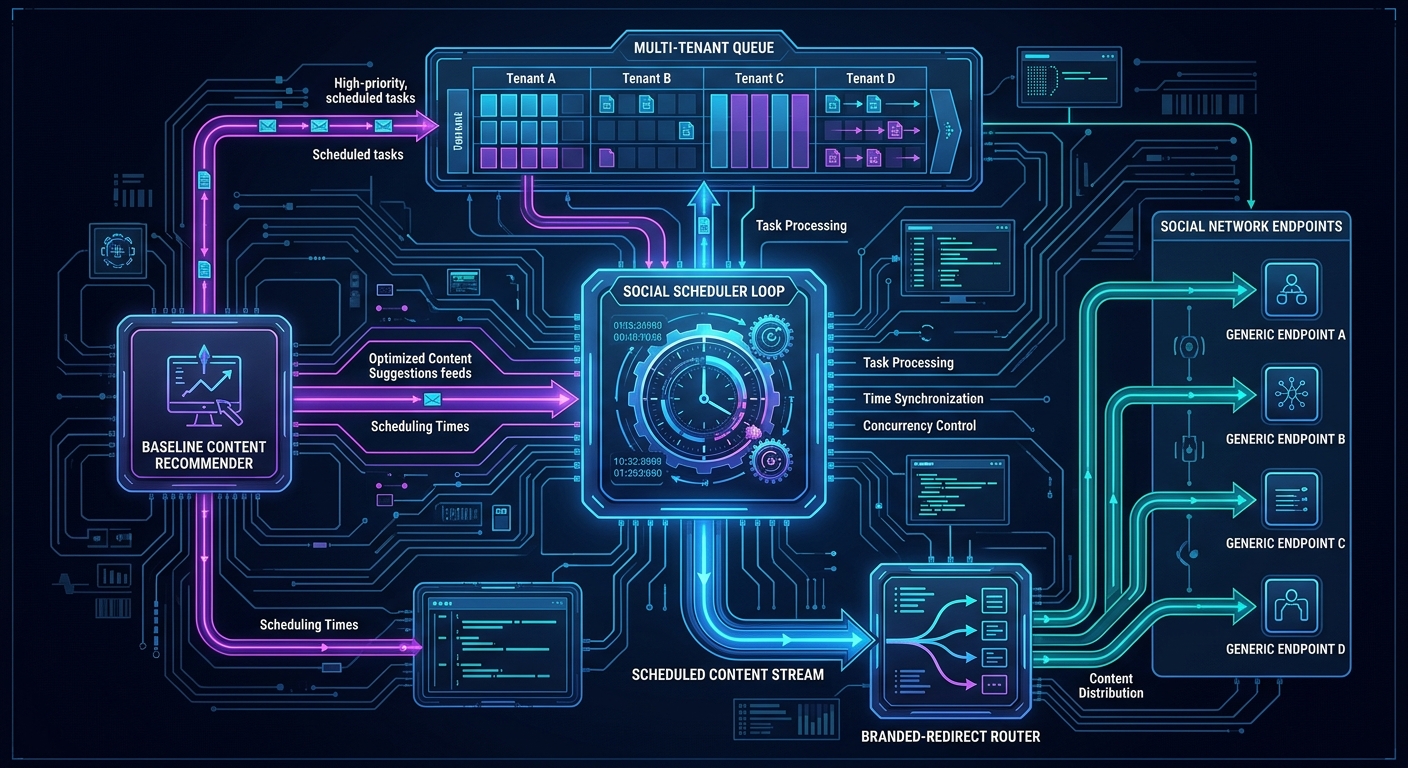
Social Compass is the product Spotlight Media Group launched in 2018 (the company's own About page gives that date) to take what had been a real-estate feature, auto-posting a finished tour to an agent's social accounts, and turn it into a general social media management tool for any small business. The public pitch is five ideas: content branding (followers who click land on your branded page, not a third party's), content curation (a library of ready-made posts by category), scheduling, hassle-free posting (or approve each post by email or text), and your own content. Later came a design tool, Compass Create, and a mobile app.
This post takes it apart as an engineer: what each of those promises required, how the scheduler decides what to post and when, and where the design was clever, hacky, or quietly dangerous.
Where it lives in the code
There is no separate Social Compass service. It's built into the existing platform, and that was a deliberate choice that I'd defend for a product that began as a feature of the tour business: same users, same brokerages and teams, same MLS data, same billing, same microsites.
The system is a handful of large classes:
Members and settings (
socialmarketing): who has a subscription, which networks they connected, how many posts per week, which days and time windows, which content categories, whether they want a "proof" email first.Content (
socialcontent): categories, the library, user-created content, likes and dislikes, previews.Networks (
socialnetworks, plus a class per network): authentication and posting, covered in post 7.Accounts (
socialcompass): sign-up, the free trial, subscription state, and the mobile app's receipt validation.Create (
socialcreate): a canvas-based template store for the graphic designer.
It also has a user hierarchy worth noting. Content and settings belong to a user, a brokerage, a team, or an admin, and a "social" user type was added later for non-real-estate customers. That is the multi-tenancy model: tenant-scoped content layers that merge at read time, with the admin layer as the shared library.
The scheduler: a per-minute decision loop
The heart of the autoposting feature is a method that runs every minute (it's on the per-minute cron described in post 4). For every active member it asks a chain of questions:
// ILLUSTRATIVE RECONSTRUCTION of the decision chain, once per member, once per minute
if ($member->paused)                                  continue;
if ($postsLast7Days > $member->perWeek)               continue;   // weekly budget
if ($alreadyPostedToday || $alreadySendingToday)      continue;   // once-per-day guard
if (!in_array(today(), $member->allowedDays))         continue;
if (!now()->between($window->from, $window->to))      continue;   // one of two daily windows
markSendingToday($member);                                         // set BEFORE posting
$content = pickUniqueContent($member);
if ($member->wantsProofEmail) sendProofEmail($member);
else foreach ($member->networks as $auth) postTo($auth, $content);
Some things I think are well done:
The per-day guard is set before the work. The flag that says "we're sending today" is written before choosing and posting content, so two overlapping minute-runs can't both post. That's the same flag-then-work idempotence from post 4, here applied to something customers can see.
Two daily time windows, chosen between. Members can save two posting windows, and the code switches between them. The effect is that the account doesn't post at exactly the same time every day, which looks less robotic.
A proof-email path. The "approve by email or text" feature is first-class: the scheduler can send a preview with accept and edit links instead of posting. It's the cheapest possible human-in-the-loop, and it's the answer to "I'm nervous about letting software post as me".
Things I'd flag on re-reading:
It's O(members) work every minute, evaluating every active member whether or not they're anywhere near their window. That's fine at hundreds of members and wasteful at tens of thousands. The fix is to precompute each member's next-eligible time and query only for rows that are due.
The "once today" flag plus no retry means a failed post is a skipped post. If the network call fails after the flag is set, nothing re-attempts it that day.
Scheduled (calendar) posts
The calendar feature is a second, simpler mechanism: a queue table holds (member, content, scheduled time, caption, networks, isPosted). A function on the same cron selects unposted rows whose time has passed, marks them posted first, and then sends. I'll repeat the caveat from post 4: marking before sending protects against double-posting and guarantees at-most-once delivery, and the price is that a crash or network failure silently drops the post. For a marketing scheduler, at-most-once was probably the right default (a duplicate post is more embarrassing than a missed one), but it should have recorded failures somewhere a customer could see.
Choosing what to post: a baseline recommender
How the platform picks "the next thing" is the part of Social Compass I find most relevant today, because it's a small, explicit content-selection system:
Candidates come from the member's chosen categories, drawn from layered sources: their own content, their brokerage's, their team's, and the shared admin library.
Exclusions: everything this member has posted in the past year (tracked in a per-member log), plus anything they've disliked. Likes and dislikes are stored per user.
Sampling: pick a category at random, then a random unseen item within it.
A time-sensitive lane: roughly one run in ten (and always when asked), look first for content that has a set date, so seasonal and holiday posts surface at the right time.
That's a recommender with an exploration rate, a de-duplication memory, explicit negative feedback, and a freshness override, in about a hundred lines and no machine learning. Every signal an ML ranker would want (engagement per post, per category, per network; dislike rate; time of day) is already being logged. The platform simply never closed the loop by using it to rank. If I were extending Social Compass today, that is where a learned ranker would start: not replacing the exclusions and the time-sensitive lane, but replacing step 3's uniform random with a score.
One hazard is worth naming, and I've now traced it. The lowest-level picker returns false when a category has nothing unseen left. The caller wraps it in a loop that re-rolls the category at random until it gets a result, with no bound. If every one of a member's selected categories is exhausted (everything seen or disliked in the past year), nothing ever comes back, and the loop spins, inside a cron process whose time limit has been removed. A bounded retry count and an explicit "library exhausted" notification would be the fix, and "your library is exhausted" is a genuinely good product message.
The branded redirect: the feature that made it different
Competitors in this space publish a link and send the click to the original article. Social Compass sent the click to a page on the member's own domain, framed with a branded header containing the member's name, photo, and contact details, with the article underneath. That's what makes it a lead-generation tool: the reader is "on the agent's site" even though the content is someone else's.
How it works, as built:
The post shares a link to a content page on the member's own subdomain or custom domain (the code checks that the custom domain actually responds before using it, and falls back to a Spotlight subdomain).
Crawlers get a different answer than people. The page uses a crawler-detection library: when Facebook's, Twitter's, or LinkedIn's scraper asks for the link, it's redirected to a clean page with the right Open Graph and Twitter Card tags so the preview image and title render correctly. A human gets the branded frame instead. (For image content the platform even generates the preview crop on demand.)
People get a header and an iframe. The page renders the member's header HTML and puts the target article in an iframe underneath it.
An embed check decides whether that will work. Many sites forbid being framed, with
X-Frame-Optionsor aframe-ancestorscontent security policy. A helper makes a request with a browser-like user agent, reads those headers, and returns "can't embed" for sites that refuse, so the product can fall back instead of showing a blank box.Cross-origin problems were patched with a server-side helper. Content inside the frame sometimes made requests the browser blocked, so in late 2016 I added a small helper that fetched the resource on the page's behalf, along with client-side script that rewrote the framed page's AJAX calls to go through it.
Number 5 is the part I'd do differently without hesitation. Rewriting a framed third-party page's network calls is brittle by nature, and I wrote it in 2016, long before tools existed that would have made me stop and reconsider. Today, the principled approach to "show the article under my header" is to render a link preview (title, image, summary, the Open Graph data you already fetched) plus a prominent link, and let the browser handle the destination. That was also, eventually, where the product trended, since more and more sites forbid framing. And any server-side helper that fetches third-party URLs belongs behind an allowlist with certificate checks on, which is a rule I follow now and a good example of a review an AI assistant makes cheap.
There's also a small piece of honesty in the code I appreciate: a couple of customer-specific special cases in the link-building function (specific brokerage and user IDs mapped to fixed domains). That's what real multi-tenant software looks like at year five: an escape hatch for the customer whose setup doesn't fit the model. The lesson is to put those in data (a per-tenant domain setting), not in if statements.
Accounts, trials, and subscriptions
The public site offers a free trial, then a monthly subscription. In the code, the sign-up path does the following in one request:
Creates (or reuses) a user, and logs them in.
Looks up the membership's price and runs the first transaction through the platform's payment layer.
Creates and activates the member record that the scheduler reads.
Syncs the person into the CRM (Infusionsoft) and adjusts tags on the contact, which is how marketing automation later knew who was a trial, who was paying, and who had churned.
It also handles the mobile app: a method validates Apple in-app-purchase receipts server-side and returns the subscription expiry, using an open-source receipts library. That's the right architecture (the server, not the app, is the source of truth for entitlement), though the shared secret it needs should never be in source, a point I'll return to in the last post.
The mobile app
The repo contains the compiled iOS bundle of a Cordova/Framework7 hybrid app (Social Compass.app): a content library, a calendar, content creation, and a camera screen, all web views talking to the same backend. A hybrid app over a mature web backend was the right cost call for a small team: one codebase, one set of APIs, and the scheduler logic stays on the server.
The app was live a long time ago, and the mobile project was later abandoned. A hosted page for it still exists at spotlight-social-compass.appstor.io. Note that this is unrelated to any similarly named app in the public app stores.
What I'd keep, and what I'd change
Keep:
Build it into the existing platform, so users, billing, brokerages, and microsites come for free.
The proof-email path as the default for nervous users.
Explicit exclusion memory and negative feedback in content selection.
Different responses for crawlers and humans, with a clean link preview for each network.
Change:
Precompute next-eligible times instead of scanning every member every minute.
At-least-once delivery with idempotency keys and a visible failure state, instead of mark-then-hope.
Replace uniform-random selection with a learned ranker trained on the engagement data the platform was already logging.
Replace the framed-article trick with a link preview plus a prominent link, and put any server-side fetching behind an allowlist.
Per-tenant settings in the database, not special cases in code.
How I'd approach this today, with AI
Plainly: Social Compass was built by hand, before AI coding tools were available to me. AI's only role in this project was the 2026 move from IIS to Ubuntu. But it's the project where AI-assisted development would have the biggest upside going forward, and the code is already shaped for it:
The selection logic is a clean seam. Step 3 (random pick) is a pure function of settings and history. An AI-assisted team can build an offline evaluation harness from the post log, train a ranker, and replace that function behind a flag, without touching the scheduler.
The decision chain is a spec. Asking an assistant to turn the minute-by-minute chain into a table-driven test (given this member and this time, should it post?) is a fast way to find the exhausted-library case before anyone changes the code.
Content generation fits naturally (captions, variants for each network's limits), but the guardrails matter more than the model: proof email first, per-network length and format checks, and a hard "no auto-post without a successful dry run" rule.
Evidence appendix
Scheduler decision chain, weekly budget, time windows, proof emails, personal-profile email path:
repository_inc/classes/class.socialmarketing.php(pusblishPost), cron entryrepository_queries/socialmark-autopost.php.Scheduled-post queue (
isPostedset before posting):class.socialmarketing.php(setSocialcontentQueue,checkSocialcontentQueue).Content selection, layered sources, likes/dislikes, one-year exclusion, time-sensitive lane, retry loop:
repository_inc/classes/class.socialcontent.php(getUniqueContent,getRandomContentID,grabRandContentItem).Branded redirect page, crawler detection, embed check, per-user domain control, OG page generation:
microsites/content.php,class.socialcontent.php(botControl,allowEmbed,userDomainControl,generateContentPage).Link building and per-tenant overrides:
class.socialmarketing.php(postContent).Sign-up, trial, membership creation, CRM tagging, iOS receipt validation:
class.socialcompass.php.Compass Create templates:
class.socialcreate.php,admin/social-hub/graphic-designer-new/.Mobile app bundle:
files/Social Compass.app/.Public descriptions: the Social Compass product page and the company About page.
Comments
No comments yet — be the first to share your thoughts.
Leave a comment
Your comment will be reviewed before it appears publicly.