From RTMP and Batch Files to HLS: Rebuilding a Video Pipeline Three Times
Part 3 of the Spotlight Media Group series. Read the overview first for the method and its limits: this repository is private, has no 15-year commit history, and everything here is reconstructed from the code. Code samples are illustrative reconstructions, not pasted source.
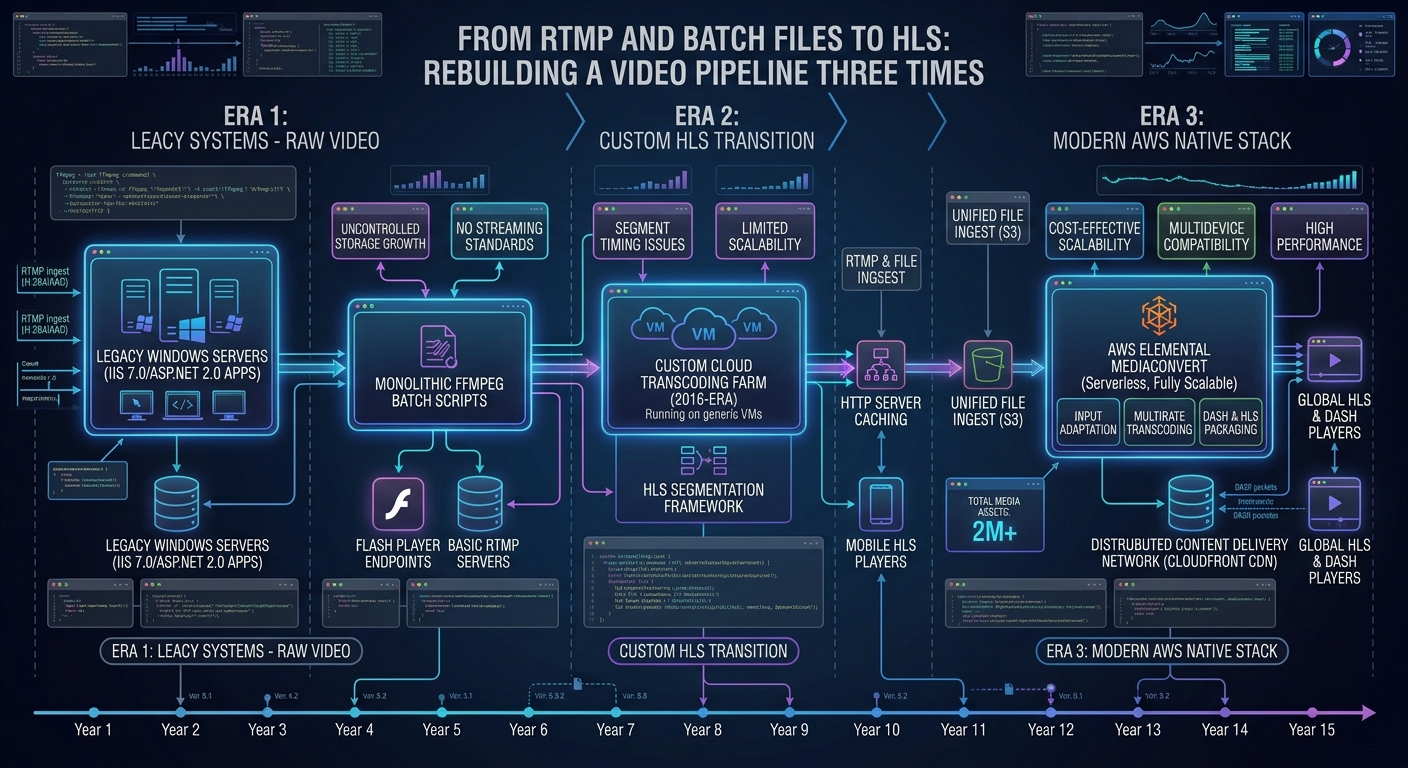
Video was the most expensive thing Spotlight sold, and the most fragile thing it served. A real estate agent expects a property video to play on the first tap, on a phone, over a bad connection, inside an email, inside a Facebook post, inside a third-party listing site. The pipeline behind that expectation was rebuilt three times over the life of the platform, and each layer is still readable in the code, stacked like sediment. This is the story of those layers and what each one taught me.
The shape of the problem
Every tour video starts as a high-quality camera file, usually a .mov from the videographer. From it the platform must produce:
A ladder of resolutions so a slow connection gets something watchable.
A poster frame for the tour page and social previews.
A mobile-safe file that a phone will play without a plugin.
A stable URL that doesn't change when the infrastructure underneath it does.
Playback also has to degrade gracefully. When the player asks "what do I play for this video?", the answer depends on the device, on which generation of processing the video went through, and on where the bytes physically are.
Layer 1: ffmpeg through generated batch files (Windows, Flash-era)
The oldest video code I can read runs on Windows. The class that processes uploads builds ffmpeg command lines as strings, and rather than executing them inline it appends them to a .bat file in a shared folder and runs that file later. The reasons are visible in the code's structure:
The web server process shouldn't hold a request open for a multi-minute encode.
Appending to a batch file turns concurrent uploads into a crude serial queue: commands pile up in order and one runner drains them.
Windows
movecommands appended to the same file relocate finished artifacts only after the encodes before them have finished.
The ladder it produced (reconstructed):
# ILLUSTRATIVE RECONSTRUCTION of the shape of the commands
ffmpeg -i video_<id>.mov -y -s 1280x720 -crf 25 video_<id>_720.mov
ffmpeg -i video_<id>.mov -y -s 854x480  -crf 25 video_<id>_480.mov
ffmpeg -i video_<id>.mov -y -s 640x360  -crf 25 video_<id>_360.mov
ffmpeg -i video_<id>_360.mov -vcodec copy -acodec copy video_<id>_360.mp4   # remux for phones
That last line is a nice small trick: the mobile file isn't re-encoded, it is the 360p rendition re-wrapped into an MP4 container, which is fast and lossless. A constant-quality setting (-crf 25) at fixed frame sizes meant output size tracked scene complexity instead of a fixed bitrate.
Delivery in this era was RTMP with SMIL manifests. For each video, the code writes a small .smil XML file listing the renditions with their declared bitrates (the top rung is labeled 1080p at 900 kbps, then 720p, 480p, and 360p stepping down) and a streaming server uses that file to pick one. The player was JW Player configured with a Flash fallback, and the code has a CloudFront RTMP distribution as a "link directly" option with a comment warning that doing so makes the video buffer frequently. That comment is the kind of honesty you only get from someone who watched it happen.
What broke, and what the code does about it
Missing renditions. Any step in a long chain of commands could fail silently. There's a
getMissing()function that globs a tour's folder for source videos, then checks whether the 360, 480, and 720 versions exist and returns what's missing. It's an audit-then-repair design: don't trust that the pipeline ran, check the filesystem and queue the gaps.Which disk? The video might live on one of three volumes. The code probes
images, thenimages-g, thenimages-fto find it. That nested "try the next volume" logic is repeated in several places. It's the price of growing storage by adding drives instead of abstracting it.Regenerating on demand. A
videoregeneratorclass (header dated August 2015, another developer's name on it) gives admins a way to rebuild missing renditions for a tour, tracked in a table with one flag per resolution and a status. It implements PHP's iterator interface so a script can loop the queue naturally.
Layer 2: ffmpeg writing HLS itself
As iPhones and then everything else dropped Flash, RTMP stopped being viable, and from about 2016 the platform moved to HTTP Live Streaming, generated entirely by our own custom ffmpeg setup on the Windows host. The next generation of the class (tourvideoshls) keeps the batch-file approach but changes the output to HTTP Live Streaming: for each rung it runs ffmpeg with a baseline H.264 profile, a fixed 30 fps, ten-second segments, and an unbounded playlist, producing .ts segment files and a per-resolution .m3u8. It then writes a master playlist by hand that lists the four variant streams with their BANDWIDTH, AVERAGE-BANDWIDTH, CODECS, and RESOLUTION attributes.
Hand-writing that master playlist deserves a comment, because it's both the right idea and a trap. Adaptive streaming players choose a rung from the declared bandwidth, so the numbers in that file are a promise about the encode. In this code the 480p and 360p entries share identical bandwidth and codec values, which tells me the numbers were copied forward, not measured. A player will still work, but its rung selection is less informed than it looks. That's a good example of a bug class that is invisible in testing and only shows up as "video is sometimes slow".
Layer 3: let AWS do it, and the "job as a template" trick
For years the encoding ran on a complete, custom ffmpeg setup on our own Windows host. Around 2022 that changed: instead of operating our own encoders, we moved to AWS services, and the problem shifted from "how do I encode" to "how do I stop operating encoders". The code contains clients for two managed services: Elastic Transcoder, which the upload path uses, and a MediaConvert client class.
The most interesting thing in the Elastic Transcoder code is how it avoids maintaining a job configuration:
A known-good, completed job in AWS (referenced by a stored ID) acts as the template.
For each new video the code reads that job back, strips every read-only field (ARN, ID, status, timing, duration, size, frame rate, detected properties), overrides just the input key and the output key prefix, and submits the result as a new job.
Outputs land under
tours/<tourID>/hls/<mediaID>/, with a masterindex.m3u8.
// ILLUSTRATIVE RECONSTRUCTION of the pattern
$template = $transcoder->readJob(['Id' => $templateJobId])['Job'];
foreach (['Arn','Id','Inputs','Status','Timing','Output'] as $k) unset($template[$k]);
foreach ($template['Outputs'] as &$o) {          // drop per-run, read-only measurements
    unset($o['Duration'], $o['DurationMillis'], $o['FileSize'], $o['FrameRate'], $o['Status'], $o['StatusDetail']);
}
$template['Input']['Key']      = "tours/{$tourId}/video_{$mediaId}.{$ext}";
$template['OutputKeyPrefix']   = "tours/{$tourId}/hls/{$mediaId}/";
$transcoder->createJob($template);
It's a hack, and I'd defend it for its era. It put the encoding recipe in AWS, where an operator could change it in the console, and the application code only supplied the two per-video values. The weakness is that the template is a single job ID hard-coded in a class, so rotating or deleting it breaks every upload. The ID itself carries a timestamp, and decoding it puts the template job in October 2022, which lines up with the hls_auto_2022 prefix in the playback code and with when the move to AWS-managed transcoding happened.
Playback: deciding what to play
The playback side is where the layers meet. The tour video page (several copies exist, with backup suffixes dated February 2015 and March 2016) makes its decision at request time:
If an HLS stream exists, redirect to the HLS player. The check tries the
hls/<mediaID>/index.m3u8path first and then the newerhls_auto_2022/path. Existence is tested with an HTTP request for the URL.Else detect the device. A mobile-detect class classifies phones and tablets.
Desktop with an MP4/MOV: try the RTMP/SMIL route, and verify it with another URL check.
Mobile: serve the
_360.mp4remux, or the HLS file if one exists.
The pattern is "probe, then fall through". It works, and it's the reason old tours kept playing for years after the infrastructure changed under them. It also costs an outbound HTTP request per probe on the hot path, which I'd replace with a stored per-video "playback generation" column set when processing completes. That is the single biggest cleanup this layer would benefit from.
What this taught me
Keep the master asset; everything else is a function of it. Because the high-quality
.movwas always retained, every earlier generation could be regenerated into the next. That's what made three migrations survivable.Audit-and-repair beats trust.
getMissing()and the regenerator exist because long encode chains fail partially. Build the repair path on day one.Hide the recipe from the code. The best idea in this pipeline is also the most fragile one: keep the encoding recipe in the managed service. The improvement is to version it and reference a named template instead of a job ID.
Declared metadata is a contract. A hand-written HLS master playlist with copy-pasted bandwidth numbers is a lie the player trusts.
Probe-on-read is technical debt with interest. Every
url_existson the playback path is latency and a failure mode you could have stored once.
How I'd approach this today, with AI
To be plain about the history: this whole pipeline was built by hand, the RTMP layer, the 2016 ffmpeg HLS layer, and the 2022 move to AWS, all before AI coding tools were available to me. AI's only role in this project was the 2026 move to Ubuntu, so none of this video code was AI-assisted.
If I were maintaining it today, video code is a good test of whether an assistant helps, because the artifacts (command strings, manifests, job templates) are easy to read and hard to validate:
Static archaeology. Ask it to enumerate every place the three storage volumes are probed, or every place a rendition name is constructed. That turns a week of grepping into minutes and surfaces the duplicated logic that needs consolidating.
Contract extraction. It can lift the implicit playback decision tree out of four near-identical player pages into one documented table, which is the first step to replacing it.
Where it does not help: it can't tell you whether the master playlist's bandwidth numbers are right. Only an encode measured with
ffprobecan. In this kind of work the assistant proposes and the tools decide.
Evidence appendix
ffmpeg ladder,
.batbatching, remux to mobile MP4, SMIL generation:repository_inc/classes/class.tourvideos.php.HLS via ffmpeg (ten-second segments, baseline profile, hand-written master playlist):
repository_inc/classes/class.tourvideoshls.php.Missing-rendition audit and regeneration queue (header dated 08-25-2015):
class.tourvideos.php(getMissing,processMissing),class.videoregenerator.php.Elastic Transcoder client and the job-as-template pattern, HLS URL resolution including
hls_auto_2022:class.awstranscoderv3.php,class.tourvideos.php(transcodeHLSVideo,getHLSVideoURL).MediaConvert client:
class.awsmediaconvert.php,class.awsclientsv3.php.Playback decision logic and backup copies dated 2015-02-12 and 2016-03-29:
tours/video-player.php,tours/video-player-hls.php,tours/video-player.php-bkup-*.
Comments
No comments yet — be the first to share your thoughts.
Leave a comment
Your comment will be reviewed before it appears publicly.