The Tour Factory: Photo Processing, Zip Delivery, and an S3 Migration Done While the Site Stayed Up
Part 2 of the Spotlight Media Group series. Start with the overview and forensic map if you haven't read it. As noted there, this repository is private and has no 15-year commit history, so everything below is reconstructed from the code, with the kind of evidence named as I go. Code samples are illustrative reconstructions of patterns, not pasted source.
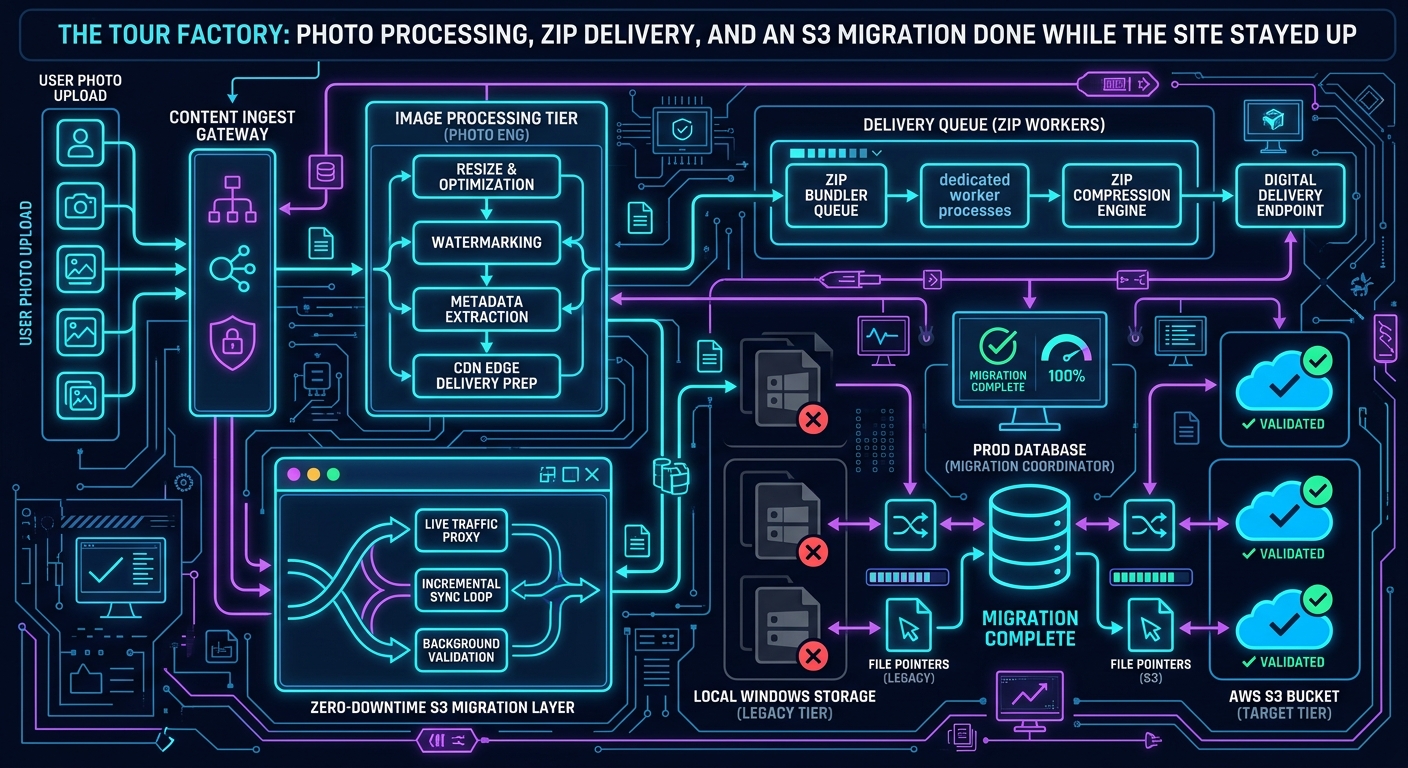
If you strip Spotlight Home Tours down to its core, it is a factory. Photographers upload large JPEGs for a property. The platform has to turn each one into a set of web-ready sizes, keep the original, store all of it cheaply, serve it fast, and later hand an agent a downloadable zip at whatever resolution their MLS or brochure printer wants. Do that for a couple hundred thousand tours and every shortcut becomes an operational problem.
This post follows that pipeline through its three lives: the on-box version, the S3 version, and the queued-and-emailed version that finally stopped asking a web request to do a batch job's work.
The business constraint behind the architecture
An agent orders a tour, a photographer shoots it, and the agent wants the finished product quickly because the listing goes live whether or not the photos are ready. Two things follow:
Latency matters at the batch level, not the request level. A tour is "done" when all its media is processed. Nobody is watching a single image resize.
Original files are the asset. Everything else can be regenerated from the high-resolution original. That single fact drives the storage design: keep the original forever, treat derivatives as a cache.
Life 1: process on the web server, store on disk
The oldest shape I can date is a 2011-era script (the header carries a June 2011 creation date and another developer's name) whose purpose is spelled out in its own comment: process photos for a tour at a specified size, and zip them up. It runs inside a web request. It reads the media rows for a tour, resizes each photo with PHP's GD library, writes a zip, and either streams it back or leaves it in a folder to be found on the next request.
That design has an appealing simplicity. It also has a ceiling, which shows up in the code as a series of workarounds:
set_time_limit(0)andignore_user_abort(true)(wrapped in a helper that the codebase callsneverDie()) so a long job isn't killed when the browser gives up.Memory limits raised in code just before the heavy step, to 600 MB in the zip builder, and to unlimited in the later cron worker.
Zip names built from the property address with a hand-written abbreviation table (
streetbecomesstr,southbecomess) so downloads were recognizable to agents.
The upload-time derivatives
Newer upload processing (the tourphotos class) takes a different approach: do the expensive work once, at upload, and store a fixed ladder of sizes. For each photo it produces a ladder of named derivatives plus the original:
thumbnail (120 px wide), small (214), 400, 600, 640, 800, 960, and 1800 in the newest production copy (older copies of the class list only six of these, so the ladder visibly grew over the years)
photo_high_<mediaID>for the untouched original
Files are named photo_<size>_<mediaID>.<ext> and keyed under tours/<tourID>/. That's a content-addressing scheme that is boring in the right way: any URL can be built from two database values, with no lookup.
Here is the shape of that loop, reconstructed:
// ILLUSTRATIVE RECONSTRUCTION of the pattern, not copied source
foreach ($sizes as $label => [$w, $h]) {
    $name = "photo_{$label}_{$mediaId}.{$ext}";
    if (resize($original, $tmpDir, $name, $w, $h)) {
        $s3->upload("tours/{$tourId}/{$name}", fopen("{$tmpDir}/{$name}", 'rb'));
        unlink("{$tmpDir}/{$name}");          // never keep derivatives on the web box
    } else {
        $errors->set("{$name} resize failed");
    }
}
// finally: move the untouched original into place and upload it as photo_high_*
A few details in the real resizer are worth calling out because they are the kind of thing you only learn from production:
Vertical photos swap the target box. If the source is taller than wide and you aren't cropping or stretching, the code swaps width and height so a portrait shot isn't shrunk into a landscape thumbnail.
Animated GIFs take a different path. They're resized frame by frame through a separate helper with a temp folder for extracted frames, because GD would flatten them.
JPEG quality is a deliberate trade-off. The upload-time derivatives on the main server are written at quality 80 (a comment beside it shows it was once 100), while the zip worker, which resizes from the original for download, writes at 100. Those are different jobs with different tolerances: one is for the screen, one is for a print shop.
PNGs get a transparent canvas, which turns black if the output is forced to JPEG. That's a bug class everybody hits once.
Where this design leaked
I want to be straightforward about what I see when I read it today. The loop decodes the full-resolution original from disk once per derivative, eight decodes for eight sizes, using GD, and the resize function I'm looking at never calls imagedestroy() to release the in-memory bitmaps. On a modern PHP, request-scoped memory cleanup hides most of that. On a long-running batch process (the zip builders, below) it's exactly how a worker's memory ratchets up until the limit you set in code is the only thing keeping the server alive. The 600M and -1 memory settings sprinkled through the zip code are the visible scars.
If I were building it again: one decode, many imagecopyresampled calls from the same in-memory source, explicit destroy, or move to a streaming tool (libvips or ImageMagick with limits) behind a queue. I'll come back to the queue part in post 4 on long-running work.
Life 2: S3, and the catch-up problem
At some point the images folders stopped fitting on the web servers' disks, and the media moved to Amazon S3. The part I find most instructive isn't the SDK calls. It's how an already-in-production catalog of media was moved without downtime.
Evidence in the code:
Tour media lived on Windows network shares across several volumes (the catch-up script probes
images,images-g, thenimages-fin order until it finds a tour's folder).A column on the
tourstable,onS3, marks whether a tour's media has been copied. New uploads write to S3 directly; old tours get picked up by a catch-up script that selectsonS3 != 1, syncs that tour's folder up with a command-line S3 client, runs a function to rewrite the tour's SMIL streaming manifests to point at the new location, records the result in ans3updatetable, and flips the flag.A second helper class,
s3zipfiles, has anuploadLastTwoWeeks()method: find recently finalized tours, check whether their zips exist, and backfill them. It returns distinct codes for "not all photos on S3" and "problem uploading", so an operator can tell why something skipped.
This is the expand-and-contract migration pattern in a Windows-share world: write new data to the new store, keep the old path readable, backfill with an idempotent job keyed on a per-row flag, and only then retire the old path. I wouldn't call it elegant. I would call it correct, and it never required taking the site down.
Storage-class decisions
Three details from the S3 wrapper tell you how storage cost was managed:
Uploads default to a one-year
Cache-Control. Derivative names include the media ID and never change, so aggressive caching is safe. The cost of that safety is that "replace a photo" must mean a new media ID.Objects were uploaded
public-read. That's a simplicity choice that I would not make today. It bought direct, signature-free image URLs; it cost per-object access control. The right modern answer is private objects behind CloudFront with signed URLs or an origin access policy.Cold tours moved to Glacier, tracked in a
tourarchivetable. The archive class doesn't trust a flag. It lists the first few objects under a tour's prefix, sees aGLACIERstorage class, and tries to read one to confirm it's really unreachable. If the read throws, the tour is deactivated and marked archived. Restores are guarded by a "restore pending" check that blocks duplicate requests for 24 hours.
That last pattern, verify the state by attempting the operation, then record it, is a habit I'd defend. The database lying about where bytes live is how you serve broken tours.
Life 3: zips as a queued, notified job
Agents don't just view photos, they download them. Zips at fixed widths (640, 800, 960, 1800) and a "high resolution" zip are a core deliverable, and they're expensive: download every derivative, re-encode, compress, upload.
Over time the delivery path was rebuilt three times, and you can read the generations straight out of the file layout (and, in this case, out of a second copy of the code that lived on a different server):
Synchronous on request. The 2011-era script builds the zip while the agent's browser waits.
Cache lookup, then fall through. A newer variant checks a
s3zipfilestable for an existing zip URL at the requested size and, if found, just redirects the browser to S3. Only a miss does the slow work.Queue, a dedicated worker, and notify. The newest path inserts a row into a
resource_requestedtable (tour, size, requesting user,flag = 0) and returns immediately. Zip building had been eating too much of the main server's resources, so it was moved to its own EC2 server inside AWS. A Windows scheduled task on the main host called a small script on that server every minute; the script checked the database for pending rows, built the zips, and made them available for download. The worker takes up to three rows per run, ordered so that real user requests (requested_byset) run before system-generated ones, marks each row as in progress first, then builds the zip. User requests get an email with the link when it's ready. System-generated requests (a requester of zero) are rebuilt silently with a forced overwrite, which is how a tour's zips were refreshed when its photos changed. A separate queue table with anurgentflag lets a rush request jump the line.
The queue design has a classic failure mode and the code shows a classic mitigation. Marking a row as taken before doing the work prevents two workers from both building the same zip, but it also means a worker that dies mid-job leaves a row that looks claimed forever. The remedy, a stuck-job reaper, is a whole topic of its own, and it's post 4.
A note on provenance, because it caught me out while writing this. The repository holds the copy of this code that was migrated from the main Windows host. The worker's code on the EC2 server is a newer, separate copy, and it differs in ways that matter. I first read only the main-server copy and drew a conclusion about the size ladder from it that the newer copy proves wrong, so I rewrote that section. The newer worker copy:
Pulls the original from S3 with the SDK, then resizes from that. The older copy fetched an already-processed image over HTTP, decoded it, and re-encoded it at quality 100 before resizing it again, which is a generational-loss pattern.
Includes inactive photos, by merging the active and inactive sets, so a zip is complete.
Prefixes each file in the zip with its row index, so two photos from the same room can't collide.
Tags each zip object in S3 (
zip_file=1) and calls back to the main site to tag zips it hasn't, so that storage rules can treat zips differently from photos.
That's the generic lesson: when the same class lives on two machines, the repository only tells you about one of them.
What I'd keep, and what I'd change
Keep:
Treat the original as the asset and everything else as a regenerable cache.
Deterministic, ID-based object names with immutable content and long cache lifetimes.
Idempotent, flag-driven backfill jobs for migrations, with distinct failure codes.
Verifying archive state by attempting the read.
Change:
One decode per source image, explicit resource release, and a hard per-job memory budget.
Move batch work off the web tier into a real queue with visibility timeouts instead of "flag = 1 and hope".
Private objects behind a CDN with signed access.
Define the size ladder in one place and generate zip options from it, so a class copy on another server can't silently diverge.
Keep one copy of shared classes and deploy it to every server, instead of hand-copying.
How I'd approach this today, with AI
A necessary honesty note: none of this pipeline was built with AI. It was written by hand, over more than a decade, before AI coding tools existed, and that's much of why it looks the way it does. The only time AI touched this project was the 2026 move from a Windows host to Ubuntu (the subject of the last post), and that was environment work, not photo-pipeline changes.
Looking at the pipeline now, though, it's a good example of how I'd use an assistant if I were extending it:
Characterization first. Have the assistant write tests that pin down what the current resizer does for the awkward inputs (portrait, GIF, PNG-to-JPEG, a corrupt JPEG that falls back to decode-from-string) before anything is refactored.
Divergence hunting. The provenance problem above, two copies of a class on two servers, is exactly what an assistant is good at: diff them, list every behavioral difference, and decide which is canonical.
Reproduction. Being able to run the real pages locally against real exported tables, which the 2026 environment work made possible, is what makes any change checkable instead of speculative.
Evidence appendix
Derivative sizes, naming, upload loop, no explicit image release in the resizer, JPEG quality values:
repository_inc/classes/class.tourphotos.php.Zip builder, 600 MB limit, upload and cleanup, queue insert (
resource_requested):class.tourphotos.php.Queue worker, in-progress flag before work, unlimited memory, email on completion:
cron_requested_resource.php(the repo copy, plus the newer copy from the dedicated EC2 worker that shows three-per-run batching, user-first ordering, and silent system rebuilds).S3 zip tables,
urgentqueue,uploadLastTwoWeeks, return codes:class.s3zipfiles.php.S3 wrapper, long cache header default,
public-read, restore, copy, batch commands:class.awss3.php,class.awss3v3.php.Catch-up migration (volume probing,
onS3flag, SMIL correction,s3updatetable): the S3 catch-up script inrepository_queries/,class.s3utils.php.Glacier archive detection and 24-hour restore guard:
class.tourarchive.php,class.awsglacier.php.2011-era synchronous zip script:
image_processor/get_photos.phpand the S3-aware variantimage_processor/s3get_photos.php.
Comments
No comments yet — be the first to share your thoughts.
Leave a comment
Your comment will be reviewed before it appears publicly.