Keeping Long-Running Work Alive on a Web Tier: Cron-by-HTTP, Advisory Locks, and a Query Killer
Part 4 of the Spotlight Media Group series. Start with the overview for the method and its limits. This repository is private and has no 15-year commit history, so everything below is reconstructed from the code. Code samples are illustrative, and I've left out hostnames and addresses on purpose.
Every system like this one eventually needs to do work that doesn't fit in a web request: encode a video, rebuild a zip, sync a listing board, fire off scheduled social posts. A modern team reaches for a queue and a worker fleet. This platform had neither for most of its life. It had a web tier, a database, a filesystem, and the Windows Task Scheduler.
This post is about what you build out of those parts, what held up, and where the design quietly lied to its operators. I'll be specific about the failure modes, because they're the part that transfers to any system you'll be asked to run.
The constraint
The platform grew on Windows/IIS (see the overview). On that stack:
A request has a time limit, and long jobs outlive it.
There is no resident worker process; code runs when a URL is requested.
Jobs are triggered from outside: Windows scheduled tasks that run the scripts in a
scheduled_tasksfolder.State has to live in the database, because the process holding it won't survive.
Everything in this post follows from those four facts.
Pattern 1: "cron by HTTP", with fan-out
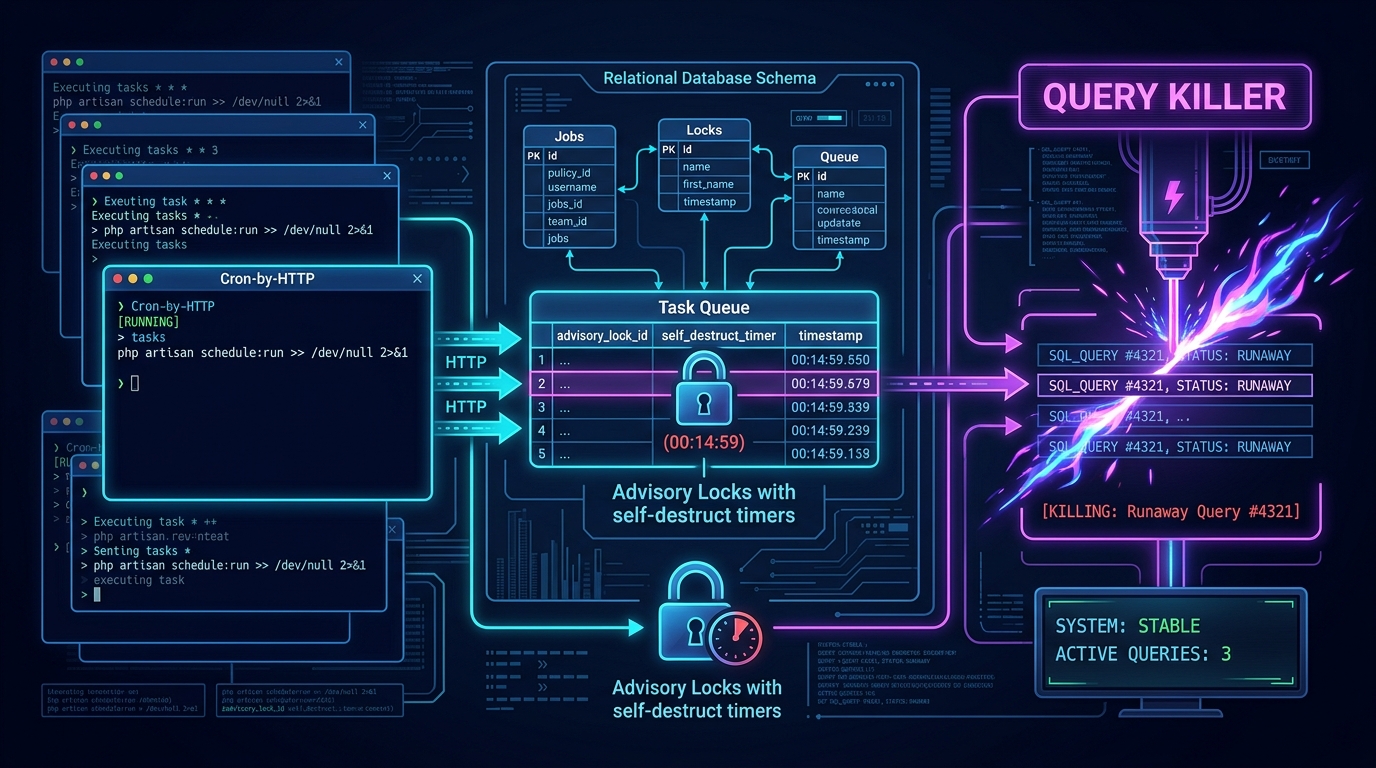
The scheduled work lives in a folder of scripts named by cadence: a per-minute script, a three-hour script, a midnight script, a weekly script. Each one is almost comically small. It sets the time limit to zero, tells PHP to keep running if the caller disconnects, and then opens a series of URLs:
// ILLUSTRATIVE RECONSTRUCTION of the shape of a "minute task" script
set_time_limit(0);
ignore_user_abort();
fopen("https://app.example/queries/process_batch_media.php",  "r");   // fire request
fopen("https://app.example/queries/hotsheet-autopost.php",     "r");
fopen("https://app.example/queries/socialmark-autopost.php",   "r");
fopen("https://worker-host.example/cron_requested_resource.php", "r"); // different machine
Read that twice, because the trick is subtle. A Windows scheduled task calls one script, and that script turns each task into its own independent HTTP request, which is its own PHP process with its own time limit and its own memory. Three things fall out of this for free:
Isolation. One task crashing doesn't stop the rest of the minute's work.
Parallelism. The tasks run concurrently, handled by the web server's worker pool.
Placement. Because it's just a URL, a task can run on a different machine. The per-minute script sends the zip-building job to a separate EC2 server (zip creation had been using too much of the main server's resources, so it got its own machine inside AWS) and the media processing to another host. That's how heavy work got moved off the customer-facing servers without any new infrastructure: you change a hostname.
It's a poor man's distributed job runner, and I'd stand behind it as a pragmatic answer for the constraints. The costs are the usual ones: no result, no retry, no back-pressure (a slow task just piles up behind the next minute's identical request), and no visibility unless each task logs for itself.
The scheduler itself was the Windows Task Scheduler on the production host: scheduled tasks that ran the PHP scripts in scheduled_tasks. That's why the repository has the scripts but not their schedule. The schedule lived in the operating system's own configuration, outside the web root, so it didn't come along when the site was copied into git, a gap worth noting for anyone migrating a legacy host.
Pattern 2: the database is the queue
Wherever a job had to be remembered across requests, it became a row. I count the same shape repeated across unrelated features:
a zip-request table with a "taken" flag and a requester (photos, post 2)
a second zip queue with an urgent flag
a video regeneration table with one flag per rendition
a scheduled-post table with an "is posted" flag (Social Compass, post 6)
an S3 sync table recording per-tour copy state
None of these is clever, and that's the point. A worker selects rows where the flag says "not done", flips the flag, does the work, and that's the whole protocol. It works until a process dies between the flip and the finish, which is why the next pattern exists.
Pattern 3: the advisory lock with a self-destruct timer
The batch job that synchronizes listing data and builds tours for the "Concierge" product (post 5) is the longest-running thing in the system. It must not run twice at once. So there's a tiny class, the process watcher, backed by one table:
Start: if no row for this job type has an empty end time, insert a row with the start time.
End: stamp the end time.
Stuck detection: if a row has had no end time for 180 minutes, consider the process dead, delete the row, and start fresh.
That is a lease with a timeout, implemented in about a hundred lines. A well-chosen number, too: the job is scheduled every three hours, so a lock held longer than that can't be a healthy run.
// ILLUSTRATIVE RECONSTRUCTION of the pattern
function runProcess(string $type): bool {
    if (!rowExists("end_time IS NULL AND type = :t", $type)) { insertStart($type); return true; }
    if (olderThanMinutes(180, $type))                        { deleteStale($type); insertStart($type); return true; }
    return false;                                            // someone else is running
}
Where it lied
Reading it again with fresh eyes, there are two honest problems:
The caller never looks at the answer. In the main batch method the watcher is invoked as a statement and its return value is ignored. As written, the lock tells you whether another run was in progress, and then the job proceeds anyway. It's an advisory lock nobody consults. Its real value was the admin report that shows "last run time", which turned it into a heartbeat more than a mutex.
A crash holds the lock for three hours. The batch loops over listing boards inside
try/catchblocks that say// Just continue!, but the exception class they catch (SomeException) isn't a real class, so no real error matches it. When a board's sync raises an exception, nothing catches it, so it skips the rest of the run and the call that stamps the end time. (Plain PHP errors in this codebase are not exceptions at all, which is its own problem, but the shape is the same.) The lock then stays held until the 180-minute timer clears it. That timer was doing the work the error handling should have.
I include this not to pick at old code, but because it's the most generalizable lesson here: a safety mechanism you never test under failure is a comment, not a safeguard. The right test is "kill the job at step N; what happens to the lock, and what does the operator see?"
Pattern 4: protect the database from the application
The database was MySQL, and it was shared by customer pages, admin reports, cron jobs, and MLS syncs. One slow report could stall everything. The platform's defense was blunt and effective: a scheduled script that runs SHOW FULL PROCESSLIST and kills any running query older than 60 seconds.
It's a circuit breaker, and it has the properties of one. It prevents the whole site from queueing behind one runaway query. It also kills legitimate long-running work indiscriminately (including, presumably, some reporting and syncing). A better version would exclude known batch users, log what it killed with the query text for later analysis, and ideally be replaced by a server-side max_execution_time or by moving reporting to a replica. But the principle, a runaway query should never be allowed to take the platform down, is the right one, and it's cheap.
Pattern 5: "never die" and memory ceilings
The glue holding the above together is a pair of tiny helpers. One sets the time limit to zero, turns off the input timeout, extends socket timeouts, and tells PHP to keep running even if the client hangs up. Nearly every class that does AWS, media, or MLS work calls it in its constructor. Memory limits are raised in code just before the heavy step: 600 MB in the zip builder, unlimited in the queue worker.
I want to be precise about what is and isn't there, since the original brief for this series asked about memory-leak tracking. There isn't any. There's no profiler, no peak-memory logging worth the name (a couple of references in the whole codebase), no worker recycling. The "strategy" was to size the limit high and let the process exit at the end of the request, which is a perfectly valid strategy for request-scoped PHP and an invalid one for anything that loops over thousands of items in one process. The image resizer in post 2 is the clearest example: it decodes bitmaps in a loop and never releases them.
What the codebase does have is forensic logging:
A shared notifications/errors pair that buffers messages in memory and writes them at object destruction, so every class instance leaves a trail.
A logger that writes daily files in a directory tree mirroring the script's own path, split into INFO and ERRORS, plus a table that records each request's IP, file, and user agent.
That's observability built from the only tools available, and it's how production bugs got diagnosed for years.
What I'd carry forward, and what I'd change
Keep:
Idempotent, row-flag job protocols that any worker can resume.
Per-task isolation (each unit of work in its own process).
Leases with timeouts instead of locks that never expire.
A hard stop on runaway database queries.
Change:
Make the lock enforce: if the watcher says no, the job doesn't run, and that's tested.
Use a heartbeat (a periodically updated timestamp) so a stuck job is detected in minutes, not hours.
A real queue with visibility timeouts and a dead-letter bucket, instead of "flag = 1 and hope".
Catch real exception types, and always release locks in a
finally.Record peak memory per job as a metric, so leaks are visible before they are outages.
How I'd approach this today, with AI
Another honest note: all of this was written by hand, before AI coding tools were available, and AI's only involvement in the project was the 2026 move from IIS to Ubuntu, which didn't change any of this scheduling behavior (the goal there was a one-to-one working copy). So this section is forward-looking.
This is the kind of code AI assistants are surprisingly good at reviewing and dangerous at rewriting. In practice:
Find the lies. Asking an assistant to trace what happens to the lock when step N throws is exactly how the nonexistent exception class and the ignored return value become visible. These are tedious for humans and trivial for a model with the whole file in context.
Write the failure test first. Before touching a job, have it write a test that kills the process mid-run and asserts the lock state. That test becomes the specification for the fix.
Don't let it "modernize" the scheduler. Replacing cron-by-HTTP with a queue is an architectural change with operational consequences, and it belongs in a plan a human reviews, not in a diff.
A practical lesson from the migration itself: the Windows Task Scheduler configuration wasn't in the repo, so the scheduled work has to be rediscovered from the scripts and re-created on the new host. If your platform's behavior depends on a scheduler, export it and commit it.
Evidence appendix
Cron-by-HTTP scripts and fan-out to separate hosts:
scheduled_tasks/minute-tasks.php,3hr-tasks.php,12am-tasks.php,run-concierge.php.Process watcher (180-minute stuck threshold, delete-and-restart):
repository_inc/classes/class.processwatcher.php.Ignored return value, nonexistent
SomeExceptioncatch, end-time stamp at the end:repository_inc/classes/class.concierge.php(build()).Long-query killer (60 seconds):
repository_inc/classes/class.security.php(killRogueQueries),scheduled_tasks/killRogueQueries.php."Never die" helpers and memory settings:
repository_inc/classes/inc.global.php,class.tourphotos.php,cron_requested_resource.php.Queue tables:
class.s3zipfiles.php,class.videoregenerator.php,class.socialmarketing.php,repository_queries/cfd342_s3_catchup.php.Logging and error buffering:
class.logger.php,class.errors.php,class.notifications.php.
Comments
No comments yet — be the first to share your thoughts.
Leave a comment
Your comment will be reviewed before it appears publicly.